Card
Cards must first perform an activation to be able to use them:
Add all cards to a member who has been assigned a group with the “All devices and locations” permission. Then go physically to a location that has a Roomlock or Cylinder and follow these steps:
- Hold the card close to the exterior knob of the Cylinder or to the Roomlock panel.
- You will hear a confirmation beep indicating the activation has started.
- Wait approximately 5 seconds without moving the card away.
- You will hear another beep, the Cylinder LED ring flashes green (on the Roomlock, the keypad backlight flashes) and the door will open.
- Card correctly activated.
You can now delete and add them to any member without needing to repeat this operation.
To configure a Card you must go to the “Members” tab, select which member you want to add it to and you will see a “Cards” section there, select +Add Card, enter the alphanumeric code that appears on the card and then press Add.
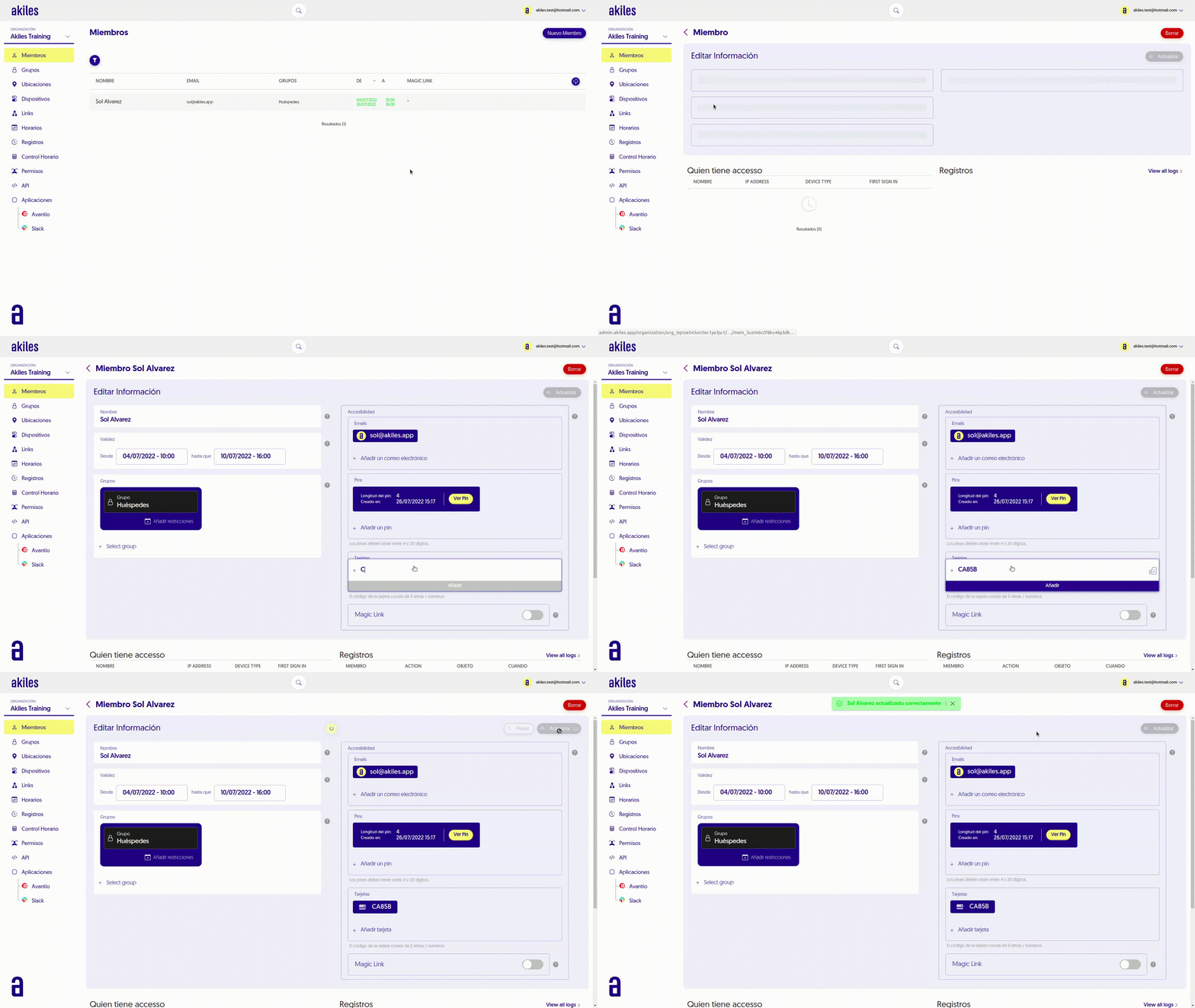
The card will work for the permissions and schedules that correspond to that Member.
To perform opening with a card simply hold it close to the exterior knob of the cylinder or to the Roomlock panel, wait to receive audio and light confirmation and open the door normally.