How to invite a member?
In Akiles you can invite as many users as you want. You have two ways to send the invitation:
- Through their email . The user will receive an invitation to download the application or to use it through the browser, with prior security authorization.
- Through “Magic Link” . You can invite a member by sharing a link that will take them directly through the browser to the digital keys. This link can be shared with as many people as desired. In the following link you have more information about the Magic Link.
A member can use both invitation options
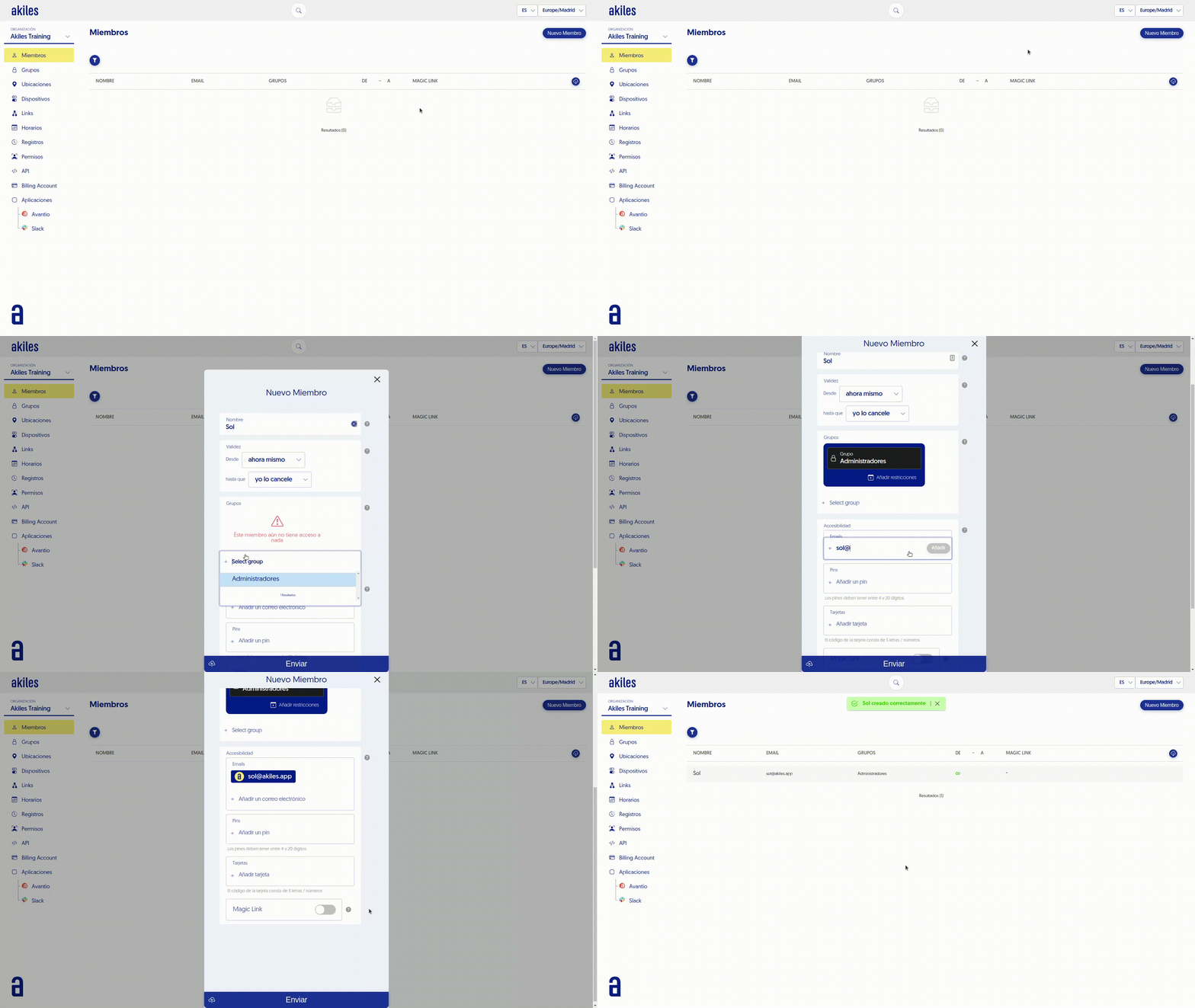
To invite a user follow these steps:
- Go to the " Members " tab and click " New member “, located in the upper right corner.
- Complete the name.
- Select the Validity. If you don’t change the default selection, it will be valid until the member is deleted or the validity is edited.
- Add the Group that has the permissions you want to assign to this Member (See Groups)
- In Accessibility you can choose the type of invitation by adding the email address or activating the Magic Link option. If you choose the latter, once you finish creating it, the link will appear for you to copy it.
- Right there you will have the PIN and Cards options in case you want to use them.
- Select Send to save the new member.