How to create a group?
In Akiles, a group is a set of temporary and location-based permissions for a set of accesses. Therefore, a group is made up of:
- Site : devices you will allow access to.
- Schedule : time slot when you can open that access or set of accesses.
- Location restriction : from where you can trigger the accesses.
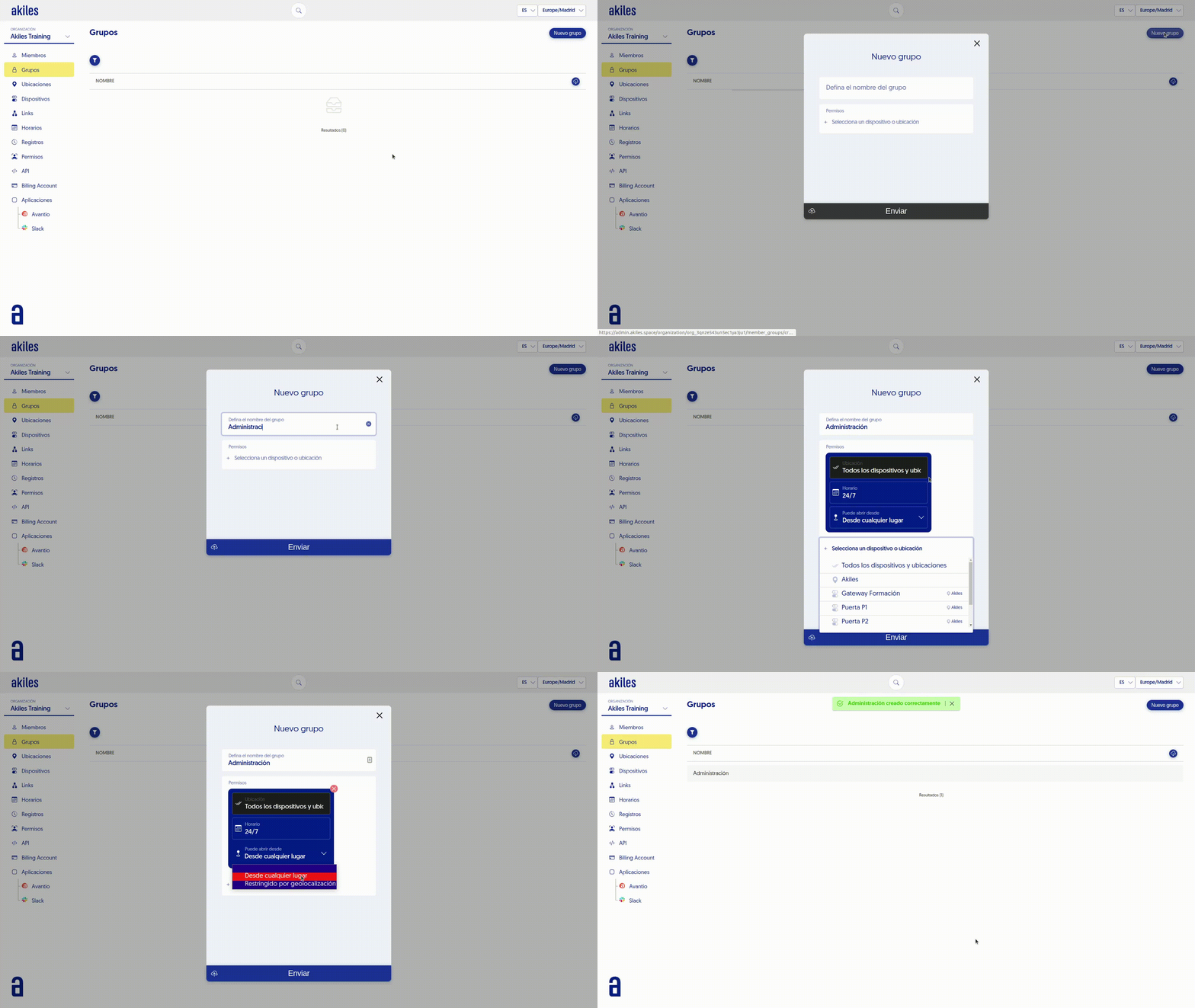
You can create as many groups as you want by following these steps:
- Go to the " Groups " tab.
- Press the " New Group " button located in the top right corner.
- Define the group name.
Select the accesses you want for this group: you can choose each device ( ) or choose the site (
 ). Keep in mind that if you choose the site, this group will have access to all devices in it.
- In schedule you can choose between 24/7 or a schedule created by you in the “Schedules” section.
- In “Can open from” select From anywhere if you want the Member to be able to open the door regardless of where they are, or Restricted by geolocation if you want them to only be able to access if they are within the established radius for that site (See [Geolocation]).
- Press “Submit” to save the changes.