Roomlock - Installation Manual
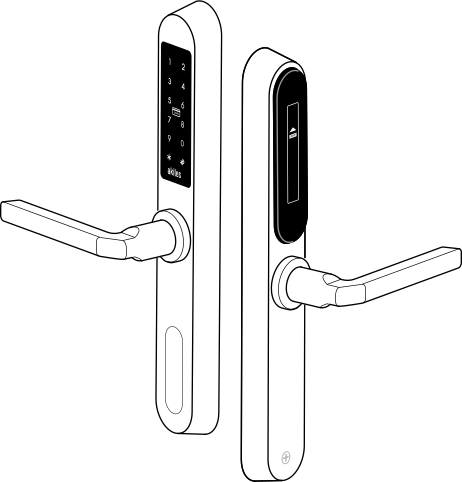
Akiles Roomlock is a device fully integrated into the Akiles access management ecosystem, battery-operated with very simple installation, which allows you to manage your access intelligently, connecting your doors to the internet, using users’ smartphones (Akiles app) as a virtual key.
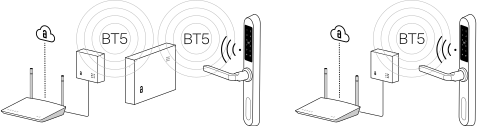
It is also possible to open the door using contactless RFID/NFC technology (by presenting a valid card) and by entering a PIN code (capacitive keypad). It can be used with European mortise locks (DIN). It is the perfect solution for any type of door, room, office, common areas, etc.
Box Contents
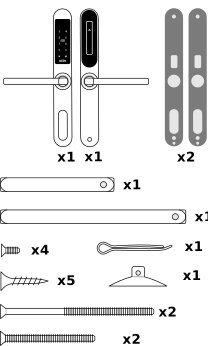
- x1 Exterior Panel
- x1 Interior Panel
- x2 Rubber Gasket
- x4 Short Screws
- x5 Long Screws
- x2 Long Fixing Screws
- x2 Short Fixing Screws
- x1 Square Spindle
- x1 Suction Cup (For extracting the cylinder cap with magnetic lock)
Description
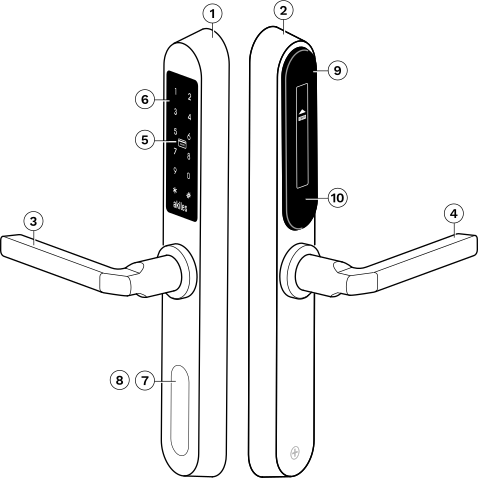
- Front (install on the exterior)
- Back (install on the interior)
- Exterior Handle
- Interior Handle
- RFID/NFC Antenna
- Backlit Capacitive Keypad
- Cylinder Cap (magnetic lock)
- Micro USB (backup power)
- Sliding Battery Cover
- Button (configuration reset)
Technical Specifications
| Feature | Description |
|---|---|
| Access | via App (smartphone), NFC card or PIN code (keypad) |
| Modes | online (with Internet connection) and offline (without Internet) |
| High Security NFC | MIFARE® DESFire® EV2 / MIFARE® DESFire® Light |
| Signaling | 12 white LEDs (keypad backlighting) and buzzer |
| Sensors | Capacitive touch sensor (12 keys) |
| Power Supply | 4 x 1.5V alkaline batteries LR03 AAA (4 V < Vbat < 6.5 V) |
| Emergency Power (micro USB) | 5V ± 10% |
| Connectivity | BT (5.0, 4.x). Internet via Akiles GWE/CE/CM |
| Battery Life | ≥ 2 years (10 operations/day. 4 x AAA alkaline 1200 mAh) |
| Firmware Updates | Over-the-Air (OTA) |
| Materials | Stainless steel 304 / ABS. Electromechanical clutch |
| Dimensions | 40 x 300 x 21.5 mm |
| Temperature Range | -10..+55°C |
| Relative Humidity Range | 10..90% (without condensation) |
| IP Rating | IP55 |
Dimensions
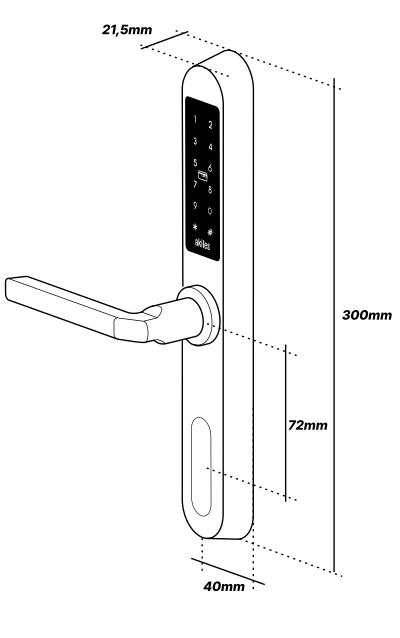
- Width: 40 mm
- Height: 300 mm
- Depth: 21.5 mm
- Cylinder Height: 72 mm
Considerations Before Installation
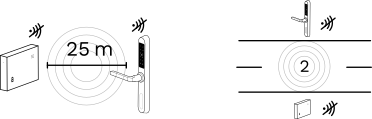
If you are going to pair 2 devices to communicate via radio frequency, the separation between them should not exceed 25 m on the same floor, nor be separated by more than 2 floors, in order to have good RF coverage. It is recommended, as far as possible, that there is a direct line of sight, free of obstacles, between the Akiles Gateway and the front of the Akiles RoomLock lock.
Once the installation has been registered on the Akiles servers (via the administration panel) and if the configuration is correct, the system should work perfectly.
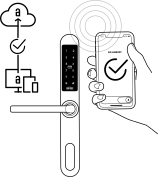
On a newly installed device, wait one minute after startup before testing the door opening.
Authorized codes and NFC cards must be registered via the administration panel. It is recommended to use Akiles NFC cards and keychains.
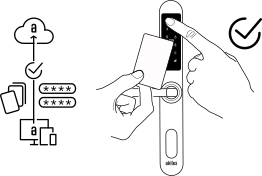
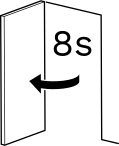
Once access has been validated (app, NFC card or PIN code), the system will connect the handles to the lock, allowing the door to open for approximately 8 seconds.
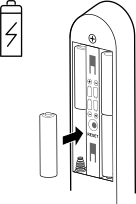
It is highly recommended to change the batteries when you receive a low battery notification (administration panel). To replace the batteries, slide the battery compartment cover vertically, applying slight upward pressure. Remove the 4 used batteries and install the new ones respecting the polarity. If they have been inserted correctly, the battery level (%) shown in the administration panel should be 100%.
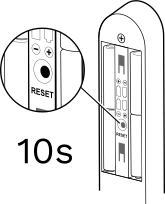
It is possible to restore the factory configuration in case a malfunction is detected in the device. To do this, use the reset button (press for more than 10 seconds) located on the battery holder (rear panel).
Device Installation
- Reuse the existing mortise lock or install a new one.

- Make the corresponding holes in the door according to the installation template provided.
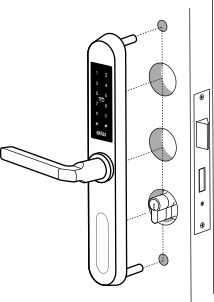
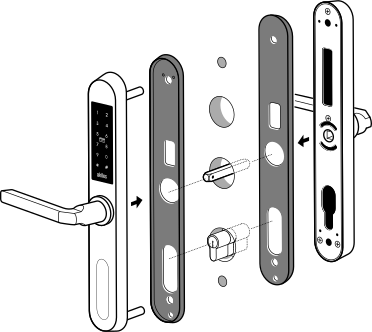
- Insert the square spindle (choose according to the door width) into the exterior handle and couple it to the interior handle. Use rubber gaskets to protect the door.


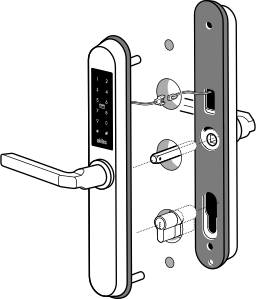
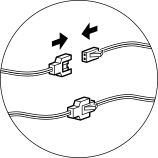
- Couple the 2 connectors (male/female) to join the power cables of the front and back of the device.
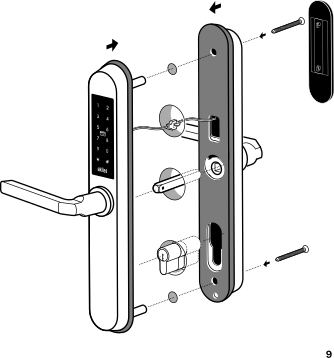
- Screw the assembly with the supplied fixing screws. Choose between the 2 types of fixing screws, depending on the door width. Make sure the assembly is firmly attached to the door.

Device Operation
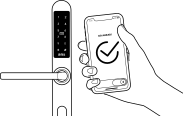
- App: The app allows you to open remotely via a smartphone with Internet connection, or locally via BT4 / BT5 without Internet connection.
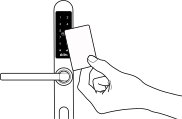
- NFC Card: Akiles customizable cards only contain the user identification (unique code), never the access permissions, which reside in the electronic lock. This greatly facilitates system administration.
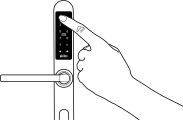
- Numeric Code: Configure as many PINs per user as you want, remotely. They will be useful in case you don’t have access to any mobile phone or card.
Changing Handle Direction
- Unscrew the handle from the back.
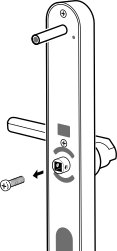
- Remove the handle, reverse the handle direction and screw it back in.
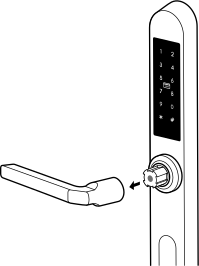
Repeat the process for the interior handle.
Batteries
Changing the Batteries
It is highly recommended to change the batteries when you receive a low battery notification. To replace the batteries, slide the battery compartment cover vertically, applying slight upward pressure. Remove the 4 used batteries from the battery holder and install the new ones respecting the polarity.
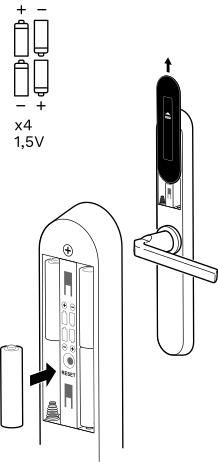
Emergency Power
If the batteries have been completely depleted, it is possible to use an external battery (5V output with sufficient charge), with a micro USB connector to power the device and thus have access capability. Once you have accessed the interior, it is recommended to change the batteries immediately.
When inserting the micro USB of the external battery, a security restart of the device occurs, so you need to wait a few seconds for the system to be fully operational.
Use the suction cup to extract the cylinder cap with magnetic lock.
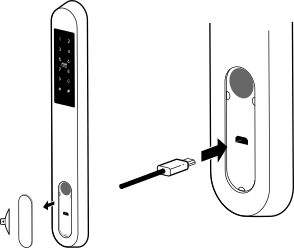
Product Wireless Features Information
BT5/BT4 Frequencies: 2400–2483.5 MHz (max. 8 dBm) NFC/RFID Frequencies: 13.553-13.567 MHz (max. 60 dBµA/m at 10 m)
Radio Frequency Exposure Information (Maximum Permitted Exposure)


This device complies with EU requirements on limiting public exposure to electromagnetic fields in order to protect health. To comply with radio frequency exposure requirements, the equipment must be used at a minimum distance of 20 cm from the user.
The WEEE symbol (Waste Electrical and Electronic Equipment) indicates that this device and batteries (if incorporated) should not be disposed of with other household waste.
When the product reaches the end of its useful life, take it to a waste collection point in your area for safe disposal or recycling.
This product meets the provisions of the European Radio Equipment Directive (2014/53/EU).
This product also meets the essential requirements of Directive 2011/65/EU (RoHS 2), 2012/19/EU (WEEE) and EU regulation no. 1907/2006 (REACH).