Cylinder - Installation Manual
Description
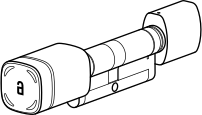
Akiles Cylinder is a device fully integrated into the Akiles access management ecosystem, battery-operated and very easy to install (no drilling or wiring required), which allows you to manage your access intelligently, using users’ smartphones (Akiles app) as a virtual key.
It is also possible to open the door with contactless RFID/NFC technology (by presenting a valid card).
The external knob rotates freely and only when access is validated does it engage with the cylinder cam, allowing you to open or close the door. It is perfect for replacing conventional mechanical cylinders with European profile.
Components
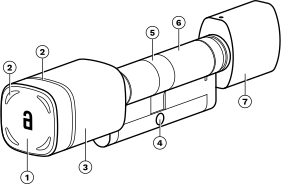
- RFID/NFC antenna
- LED ring (red/green/blue)
- External knob
- Thread for fixing screw
- Rotating cam
- Cylinder (European profile)
- Internal knob
Box Contents
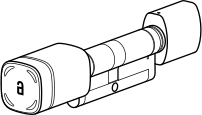
- 1x Akiles Cylinder
- 1x Fixing screw

- 1x Fixed wrench

- 1x Allen key

Technical Specifications
| Feature | Specification |
|---|---|
| Access | Via App (smartphone), NFC card, Akiles Pinpad (remote mode) |
| Modes | Online (with Internet connection) and offline (without Internet connection) |
| High Security NFC | MIFARE DESFire EV2/Light |
| Signaling | 360° ring with 4 RGB LEDs (red/green/blue) and buzzer |
| Power Supply | 1 x 3V lithium battery CR2 (2 V < Vbat < 3 V) |
| Connectivity | BT (5.0, 4.x). Internet via Akiles Ethernet Gateway/Controller/Mobile Controller |
| Battery Life | ≥ 9 months (10 operations/day. 1 x CR2 lithium 850 mAh) |
| Firmware Updates | Over-the-Air (OTA) |
| Materials | Stainless steel 304/ABS/Zinc alloy. Electromechanical clutch |
| Dimensions | Modular design. Cylinder size adjustable from 30/30 to 90/90 mm in 10 mm steps |
| Temperature Range | -10..+55°C |
| Relative Humidity Range | 10..90% (non-condensing) |
| IP Rating | IP66 (suitable for outdoor use) |
Dimensions
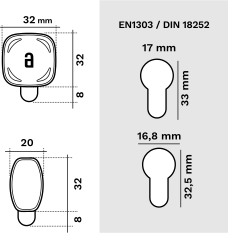
- European profile cylinder compatibility EN1303 / DIN 18252
- Front: 32 mm x 32 mm
- Back: 20 mm x 32 mm
- Cylinder measurements:
- 17 mm (front)
- 16.8 mm (back)
- 33 mm (front height)
- 32.5 mm (back height)
Configurations
(Check available measurements)
- Half cylinder
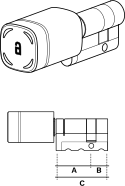
- Single cylinder
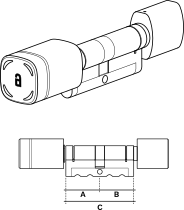
- Double cylinder
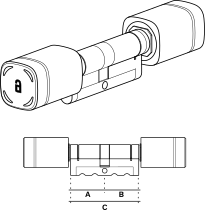
- Glass door cylinder
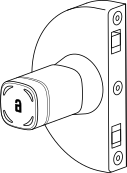
Installation Considerations
Cylinder dimension: Check beforehand the dimension of the Akiles Cylinder most suitable for your door. Modular design (from 30/30 to 60/60 mm) in 10 mm steps.
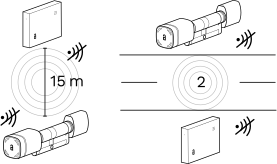
Distance between Bluetooth devices: If you are going to pair 2 devices to communicate via Bluetooth, the separation between them should not exceed 15 m on the same floor, nor be separated by more than 2 floors, in order to have good RF coverage.
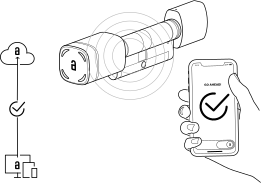
Configuration in admin panel: Once the installation is registered on Akiles servers (via the admin panel) the system will be fully operational. In case of error, check the configuration in the admin panel.
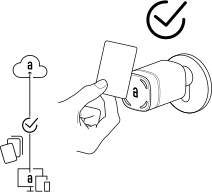
NFC cards: Akiles NFC cards and keychains must be registered via the admin panel.
Startup time: On a newly installed device, wait one minute after startup before testing the door opening.
Emergency exit: It is always possible to exit the space using the internal knob, regardless of the device status and battery level.
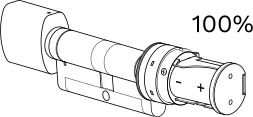
Battery level: For new batteries, if inserted correctly, the battery level (%) shown in the admin panel is 100%.
Device Installation
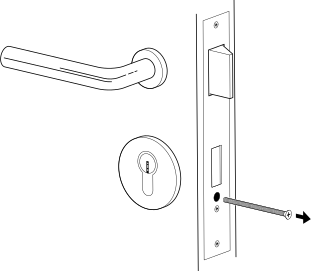
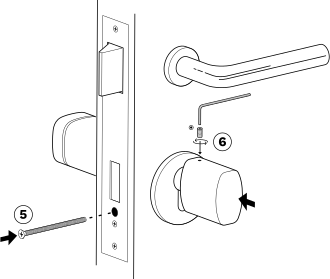
- Use a screwdriver to remove the fixing screw.
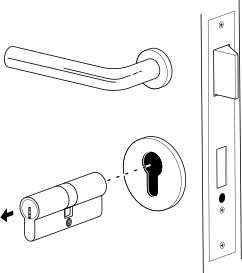
- Remove the existing cylinder.
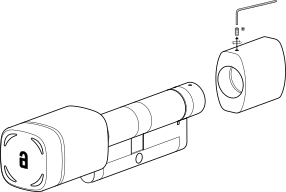
- Unscrew and remove the internal knob.
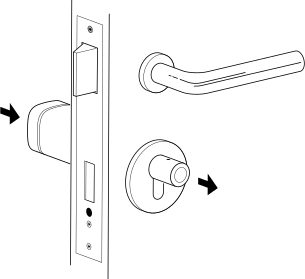
- Insert the Akiles Cylinder into the lock.
-
Secure the Akiles Cylinder in position using the fixing screw.
-
Secure the internal knob using the supplied Allen key. Align the pivot of the cylinder body with the slot of the external knob.
Device Operation
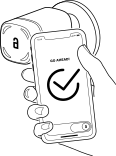
- App: The app allows remote opening via a smartphone with Internet connection, or locally via BT4 / BT5 without Internet connection.
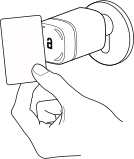
- NFC card: Present the card to the front of the external knob (must be previously registered in the admin panel).
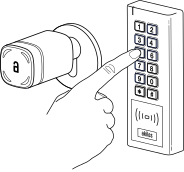
- PIN code (Pinpad): Enter a valid code (enabled in the admin panel).
- Opening: Once opening is authorized via App/card/Pinpad, turn the external knob to open the door or engage the latch.
Battery
Battery Replacement
It is highly recommended to replace the battery when you receive the low battery notification. To change the battery, you need to remove the external knob cover using the supplied tool, remove the used battery from the battery holder and place the new one respecting the polarity.
Battery type: 1 x CR2 3V
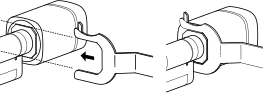
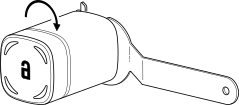
- Loosen the locking ring (keep the key fixed and turn the knob to the left).
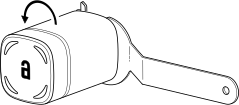
- Remove the external knob cover slowly and carefully.
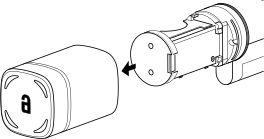
- Insert the battery respecting the polarity.
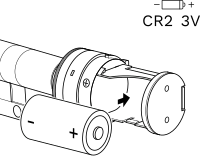
- To replace the cover, take into account the alignment pivot.
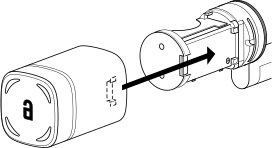
- Screw the knob back on (keep the key fixed and turn the knob to the right).
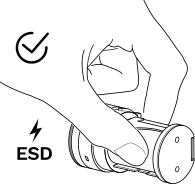
ESD Precaution
Do not directly touch electronic components to avoid possible electrostatic discharge. If necessary, touch only the battery or plastic elements.
Compliance Information
Product Wireless Features Information
- BT5/BT4 frequencies: 2400–2483.5 MHz (max 8 dBm)
- NFC/RFID frequencies: 13.553-13.567 MHz (max 60 dBµA/m at 10 m)
Radio Frequency Exposure Information (Maximum Permitted Exposure)
This device complies with EU requirements on limiting public exposure to electromagnetic fields in order to protect health. To comply with radio frequency exposure requirements, the equipment must be used at a minimum distance of 20 cm from the user.
Declarations of Conformity


This product complies with the provisions of the European Radio Equipment Directive (2014/53/EU).
This product also complies with the essential requirements of Directive 2011/65/EU (RoHS 2), 2012/19/EU (WEEE) and EU Regulation No. 1907/2006 (REACH).
The WEEE symbol (Waste Electrical and Electronic Equipment) indicates that this device and batteries (if incorporated) should not be disposed of with other household waste.
When the product reaches the end of its useful life, take it to a waste collection point in your area for safe disposal or recycling.