Controller Mobile - Installation Manual
Description
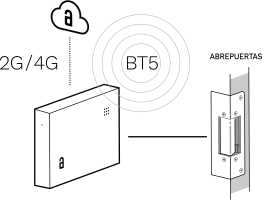
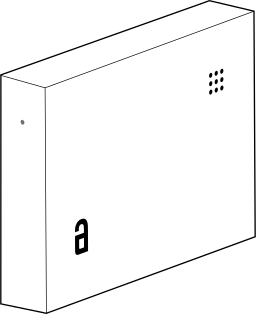
Akiles Controller is a device designed to operate on any lock and/or electrified automation system: community portals, blinds, parking lots, elevators, main entrances, sliding doors, turnstiles, swimming pools, gyms.
Greater physical security than traditional access control systems. For opening community portals, there is no need to install anything outside the home.
Compatible with traditional opening. Akiles Controller allows you to maintain traditional opening in parallel with Akiles management, whether with a physical key, biometric sensor, proximity card or numeric keypad.
Remote configuration. Akiles Controller allows remote configuration of multiple parameters that improve user experience and facilitate management by administrators. The configuration of opening routines allows that, once the community portal is opened, the elevator descends autonomously without the user having to call it from the App or from the elevator’s own button.
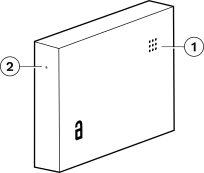
- 1. RGB LED (status)
- 2. Reset (factory values)
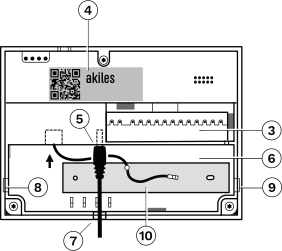
- 3. Connection pins
- 4. Label with serial number
- 5. Power jack (5.5 x 2.1 mm)
- 6. Cable housing
- 7. Cable pass-through hole
- 8, 9. Cable pass-through holes (openable)
- 10. Antenna
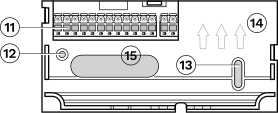
- 11. Pluggable terminals (2 + 12)
- 12, 13. Holes for wall anchoring
- 14. Bracket orientation (upward)
- 15. Cable pass-through hole.
Technical Data
| Characteristic | Specification |
|---|---|
| Modes | Online (with Internet connection) and offline (without Internet connection) |
| Mounting | Standalone/Wall (optional) |
| Color | White RAL 9016 |
| Signaling | 1 light indicator (RGB LED) and 1 acoustic indicator (Buzzer) |
| Power Supply | 12V AC/DC & 24V DC (Jack 5.5 x 2.1 mm or terminals) |
| Switching Capacity | Relay 1: 230 V AC (Max. 5 A). Door opener connection Relays 2 and 3: 30 V DC (Max. 2A). Intercom connection |
| Connectivity | BT (5.0, 4.x). 2G /4G |
| Firmware Updates | Over-the-Air (OTA) |
| Material | Polished ABS V0 |
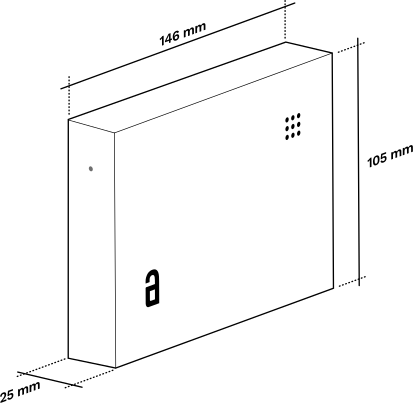
| Dimensions | 146 x 104 x 25 mm |
| Temperature Range | 0..+45°C |
| IP Rating | IP20 (indoor use only) |
| Terminal Capacity | 0.2 < mm² < 2.5, push-in terminals (no screw) |
Light Indicator Signals (RGB LED)
| Color | Flashing | Meaning |
|---|---|---|
| Blue | No | Started, everything OK |
| Blue | Fast | Updating configuration |
| Blue | Slow | Updating firmware |
| Green | — | Opening performed correctly |
| Red | No | Restart |
| Red | Fast | Resetting factory values |
| Yellow | 1 | No connection received from gateway |
| Yellow | 2 | No connection with Controllers/ Cylinders/ Roomlocks |
| Purple | 1 | No network coverage |
| Purple | 2 | Network registration failed |
| Purple | 3 | Network registration OK, DNS error |
| Purple | 4 | Network registration OK, DNS ok, connection error |
| Purple | 5 | No SIM |
Dimensions
Terminal Nomenclature
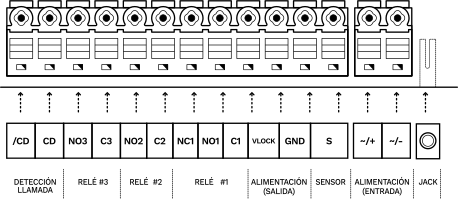
| Terminal | Description |
|---|---|
| NO1 | Normally open contact of relay 1 |
| NC1 | Normally closed contact of relay 1 |
| C1 | Common contact of relay 1 |
| C2 | Common contact of relay 2 |
| NO2 | Normally open contact of relay 2 |
| C3 | Common contact of relay 3 |
| NO3 | Normally open contact of relay 3 |
| CD | Call detection (positive) |
| /CD | Call detection (negative) |
| ~/+, ~/- | Power supply (input). The device can be powered either through these terminals or through the power jack. |
| S | Sensor input (connect between S and GND). Connect a magnetic sensor to detect the door status or a push button/switch for additional functions. |
| GND | Ground |
| VLOCK | Power output (same voltage as the ~ / + terminal and the positive of the jack) |
Installation Diagram
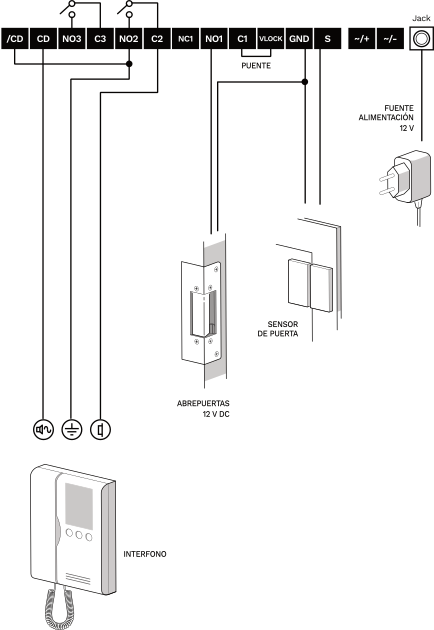
The diagram shows the typical connection with:
- 12 V DC / 2 A power supply
- Intercom (connection via call detection)
- 12 V DC door opener
- Door sensor (optional)
- Bridge between terminals C1 and VLOCK
Considerations Before Installation
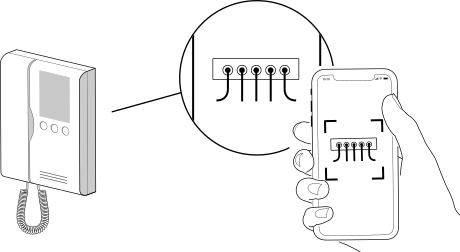
Before manipulating the intercom connections, it is recommended to take a photograph of the wiring at its corresponding connection terminals. It may be useful later.
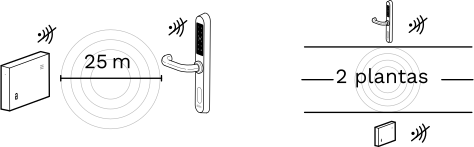
If you are going to pair 2 devices to communicate via Bluetooth, the separation between them should not exceed 25 m on the same floor, nor should the devices be separated by more than 2 floors, in order to have good wireless coverage.
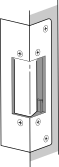
The cable section and power source amperage must be sized according to the door opener consumption (consult the manufacturer’s data sheet for the door opener model used).
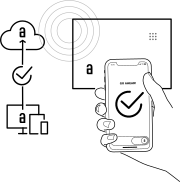
Once the installation has been registered on the Akiles servers (via the administration panel) and if the configuration is correct, the system should work perfectly after powering it on.
On a newly installed device, wait one minute after startup before testing the door opening.
It is recommended that the installation of this Akiles access control system be carried out by an electrical installer.
Device Installation
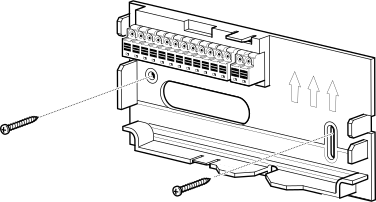
- Fix the wall bracket in the desired location. Ideally close to the intercom and the door frame, on the lock side. Power supply connection must be possible.
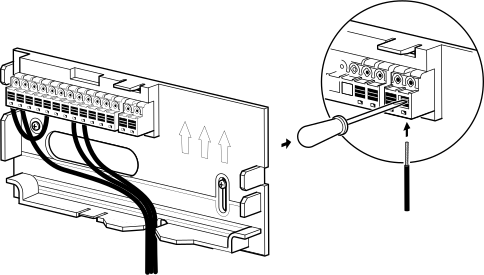
- Make the appropriate connections on the wall bracket terminals according to the installation diagrams provided.
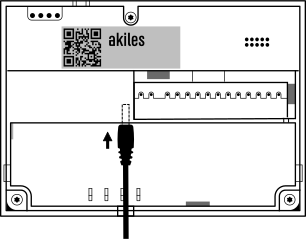
- Connect power supply.
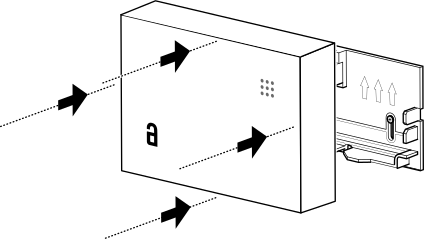
- Insert the device into the wall bracket until both fit perfectly.
Device Operation
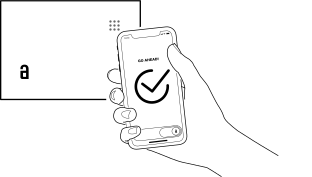
App: The app allows remote opening via a smartphone with internet connection, or locally via BT4 / BT5 without internet connection.
Product Wireless Features Information
BT5/BT4 Frequencies: 2400–2483.5 MHz (Max. 8 dBm)
2G (GPRS)/CAT-M/NB-IoT Frequencies:
- 2G 900 MHz, 2G 1800 MHz
- Cat M1 B1, Cat M1 B3, Cat M1 B8, Cat M1 B20, Cat M1 B28
- NB2 B1, NB2 B3, NB2 B8, NB2 B20, NB2 B28
RF Power:
- 2G 900 MHz RF Power Class: 4 (Max. 33 dBm)
- 2G 1800 MHz RF Power Class: 1 (Max. 30 dBm)
- LTE RF Power Class: 5 (Max. 20 dBm)
Radio Frequency Exposure Information (Maximum Permitted Exposure)
This device complies with EU requirements on limiting public exposure to electromagnetic fields in order to protect health. To comply with radio frequency exposure requirements, the equipment must be used at a minimum distance of 20 cm from the user.
Standards and Certifications


This product complies with the provisions of the European Radio Equipment Directive (2014/53/EU).
This product also complies with the essential requirements of Directive 2011/65/EU (RoHS 2), 2012/19/EU (WEEE) and EU Regulation No. 1907/2006 (REACH).
The WEEE symbol (Waste Electrical and Electronic Equipment) indicates that this device and batteries (if any) must not be disposed of with other household waste.
When the product reaches the end of its useful life, take it to a waste collection point in your area for safe disposal or recycling.